
ADVERTISEMENT
Category
Video Players & EditorsVersion
2.2
Developer
NeoYantra Technologies
Size
16.2
Package Name
com.neoyantra.airplaymirror.airplaymirrorappdemo
ADVERTISEMENT
AirPlayMirror (Demo) is a receiver app designed for Android devices that allows users to mirror and project their Apple devices' screens onto their Android phones or tablets. It supports a wide range of Apple AirPlay devices, including iPhones, iPads, iPodTouches, MacBook, iMac, or MacMini, making sharing your Apple device's screen and content with family, friends, colleagues, customers, or business partners a breeze. Whether you want to give a presentation, share a photo album, or stream a video, AirPlayMirror (Demo) makes it possible from your Android device. With its user-friendly interface and easy-to-follow directions, you can start sharing your Apple device in no time.
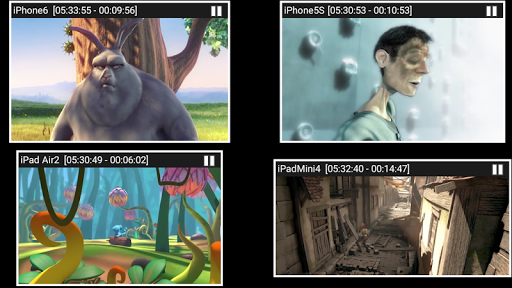
AirPlayMirror (Demo) supports mirroring the screen of an Apple device running on iOS version 9 to 15, allowing users to mirror and project up to 4 Apple devices simultaneously. In addition, it also supports playback of Apple device media content, from photos, images, videos to music, and even playback of YouTube free content from an Apple device to AirPlayMirror receiver. It includes a slideshow feature that allows users to display their photo albums or pre-selected videos on their Android device's screen.
AirPlayMirror (Demo) also comes with a passcode feature that enables users to restrict unauthorized access to their Apple device while sharing their screen or streaming content. This adds an extra layer of security for users who want to avoid others from remotely accessing their Apple device without their knowledge.
Users can easily resize and move the mirroring/casting window in the App view, giving them complete control over the projection's visual elements. Moreover, the app is equipped with Bluetooth Low Energy-based Airplay advertising, allowing users to mirror devices across different subnets efficiently.
Using AirPlayMirror (Demo) is simple and straightforward. First, launch the app on your Android device, which will start advertising the device as an AirPlayMirror Receiver with its default name. Then on your Apple device, enable AirPlay and select AirPlayMirror Receiver's name from the list, and enable mirroring using the slider. Ensure that both devices are on the same network for the mirroring to work correctly.
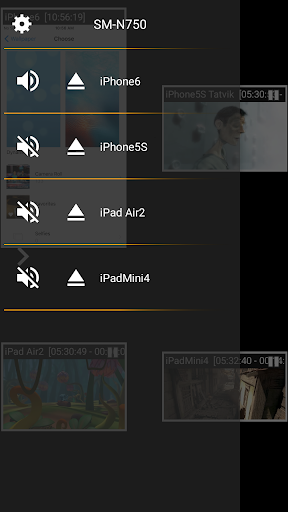
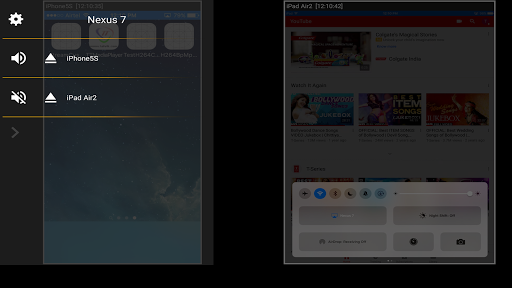
Once connected, the list of Apple devices connected to the App will be shown in the semi-transparent control-screen. For unhindered mirroring, swipe the control screen to the left by touching outside the control screen.
Users can also easily disconnect an Apple device and mute/unmute the mirroring/casting by touching the mirroring window in the App for about two seconds or by going to the control screen and performing disconnect and mute/unmute.
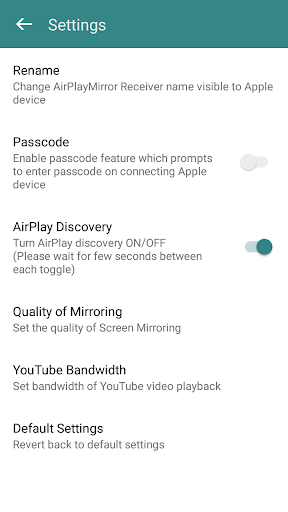
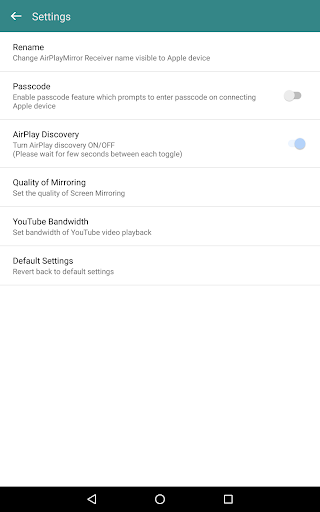
AirPlayMirror (Demo) allows users to customize the settings to their liking. By touching the settings icon on the control-screen, users can navigate to Settings, where they can enable/disable password for authentication, change the quality of mirroring, set YouTube bandwidth, toggle AirPlay Receiver discovery to on/off, and reset to default settings.
Whether you're looking to share your Apple device screen for personal or professional reasons, AirPlayMirror (Demo) is the perfect solution for you. With its easy-to-use interface and a wide range of features, it's a must-have app for Android users. To get started, download AirPlayMirror (Demo) from the Google Play Store today! For further inquiries, contact us at [email protected].
ADVERTISEMENT
ADVERTISEMENT





Welcome to Apkparks - your go-to destination for downloading the latest and most popular Android apps. Our mission is to provide a safe, reliable, and user-friendly platform for Android users to discover and download the best apps.
At Apkparks, our top priority is to deliver top-notch content that is relevant to our users. Our team of experts carefully selects and reviews each app before it is available for download on our platform. We also regularly update our app library to ensure our users can access the latest versions of their favorite apps.
At Apkparks, we provide a wide range of high-quality apps that cater to all your needs. Our platform is continuously updated with the latest and hot apps, ensuring users can access the most up-to-date apps.
We prioritize providing a seamless and hassle-free app download experience. Our website is easy to navigate, and our download process is quick and secure.
Thank you for choosing Apkparks as your trusted source for Android apps. We hope you enjoy using our platform and welcome your feedback and suggestions.


